> For the complete documentation index, see [llms.txt](https://docs.startdeliver.io/llms.txt). Markdown versions of documentation pages are available by appending `.md` to page URLs; this page is available as [Markdown](https://docs.startdeliver.io/managing-customers/deals/deal-products-and-pricing.md).

# Deal products & pricing

Set up the products, variations and prices that your team adds to deals.

**Where to find it:** Settings → Deals → Products

**Who can access it:** Admins

## What it does

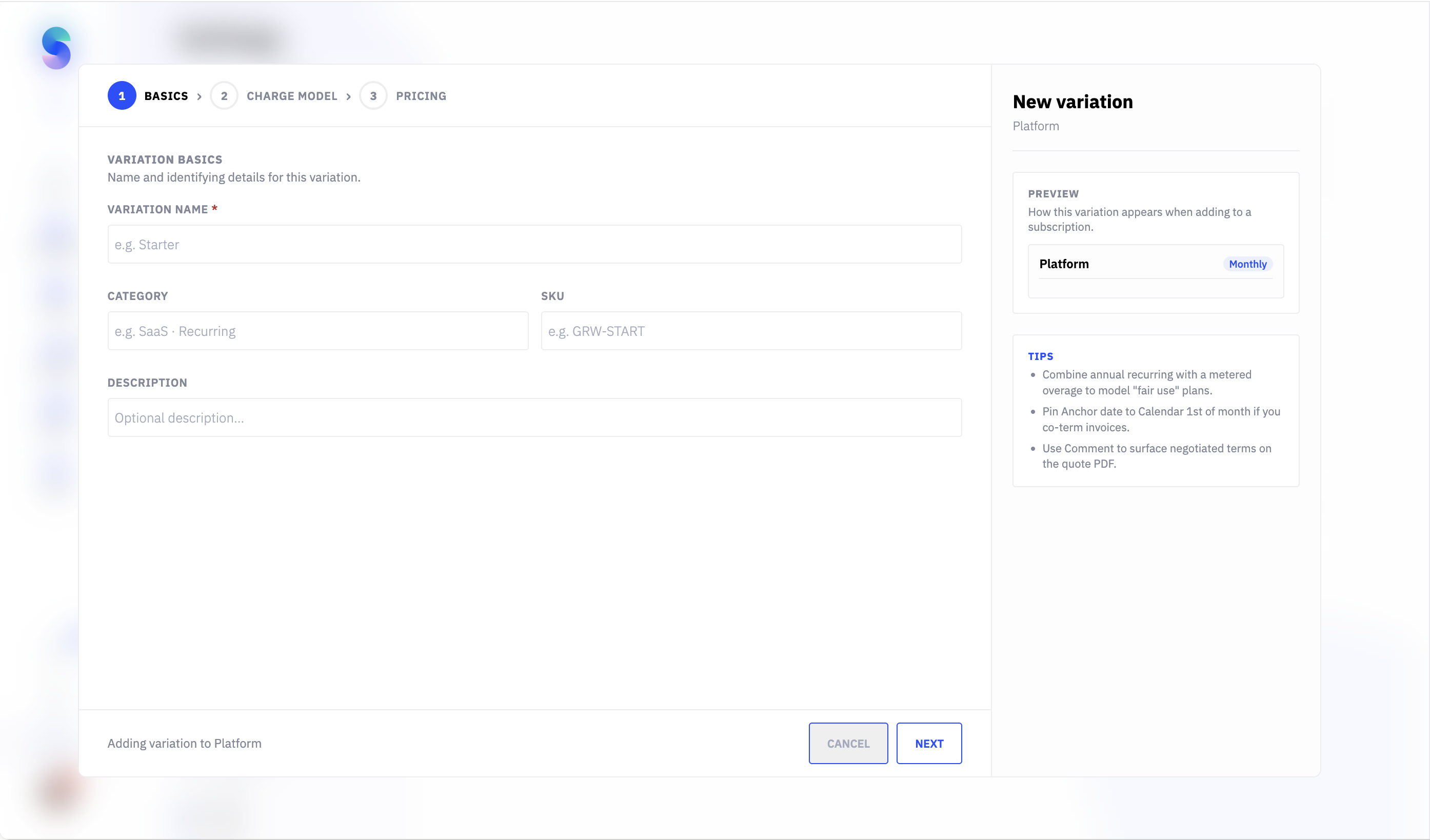
Products are what your team adds to a deal. They are organized in **product families** (for example "Platform"), and each family has one or more **variations** (for example "Pro plan", "Business plan" and "Enterprise"). Each variation has its own charge model, price and billing cycle. When someone adds a variation to a deal, its price and billing cycle are filled in automatically. The price can still be changed on the deal.

<figure><img src="https://files.gitbook.com/v0/b/gitbook-x-prod.appspot.com/o/spaces%2Fttka6LKL3bc1LsaDzuI5%2Fuploads%2F1y62L2SbJ71XUaDmQtWy%2FSka%CC%88rmavbild%202026-10-12%20kl.%2011.34.38.png?alt=media&#x26;token=f6dcd8c6-41e9-43fa-ad7c-d956c09bcd6e" alt="Settings → Deals → Products"><figcaption><p>Settings → Deals → Products, with a product family and its variations.</p></figcaption></figure>

***

## Manage product families

Go to **Settings → Deals → Products**. Each product family shows its variations with name, charge model, price, cycle and SKU.

* To add a family, click **Create new product**.
* To change a family, click **Edit**.
* To stop using a family, click **Archive**.

***

## Add a variation

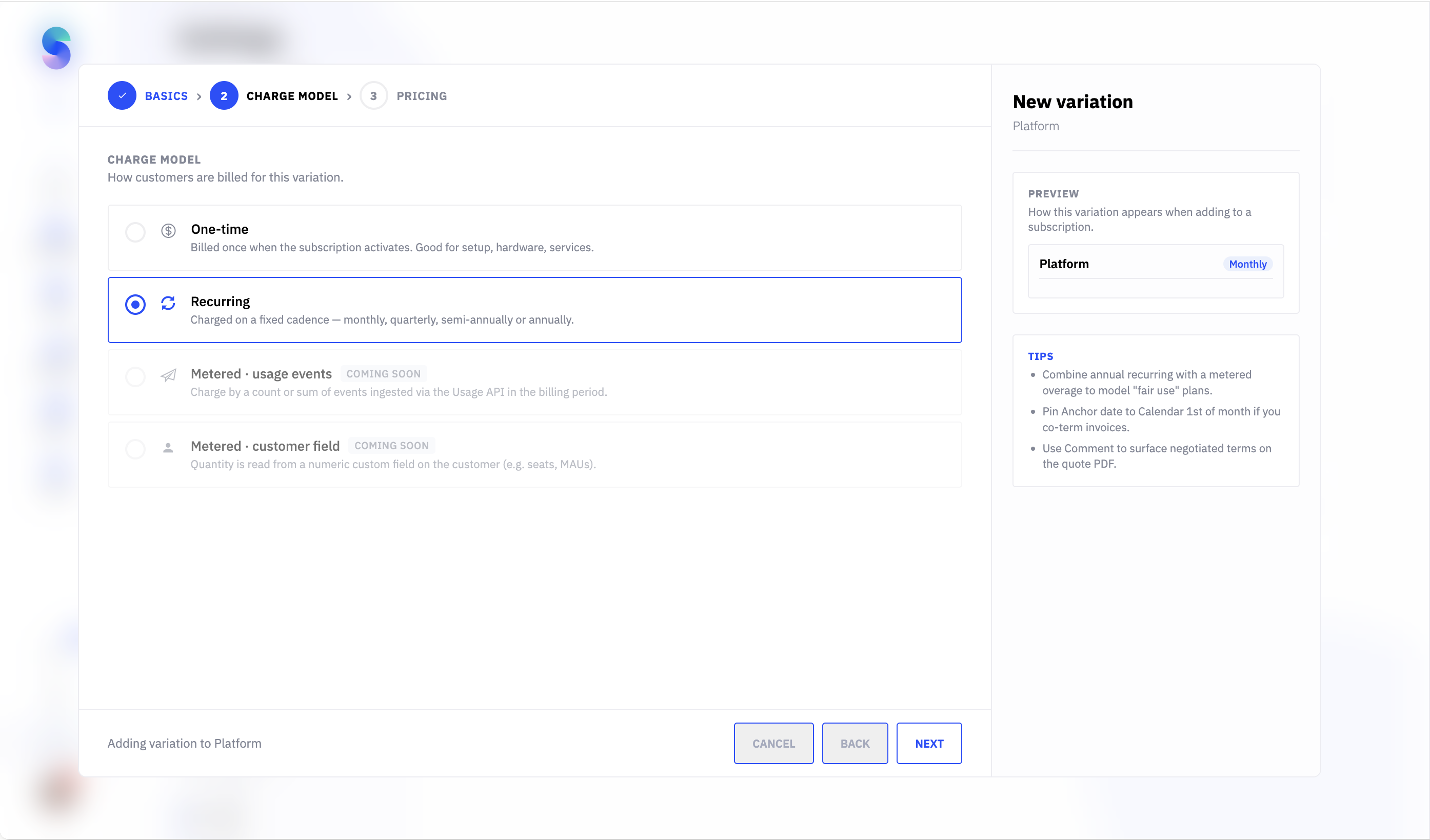
Click **+ Add variation** on the product family. The window has three steps. A preview on the right shows how the variation will look when it is added to a deal.

### 1. Basics

<figure><img src="https://files.gitbook.com/v0/b/gitbook-x-prod.appspot.com/o/spaces%2Fttka6LKL3bc1LsaDzuI5%2Fuploads%2FRiOd0ytv4vsPktnb2ukT%2FSka%CC%88rmavbild%202026-10-12%20kl.%2011.34.54.png?alt=media&#x26;token=792e5445-e8b1-4c77-a094-a4bf860a0bde" alt="The Basics step of the Add variation window"><figcaption><p>Step 1 of the Add variation window: Basics.</p></figcaption></figure>

| Field          | Description                                               |
| -------------- | --------------------------------------------------------- |
| Variation name | The name shown on deals, for example "Starter". Required. |
| Category       | Optional grouping, for example "SaaS - Recurring".        |
| SKU            | Optional product code.                                    |
| Description    | Optional description.                                     |

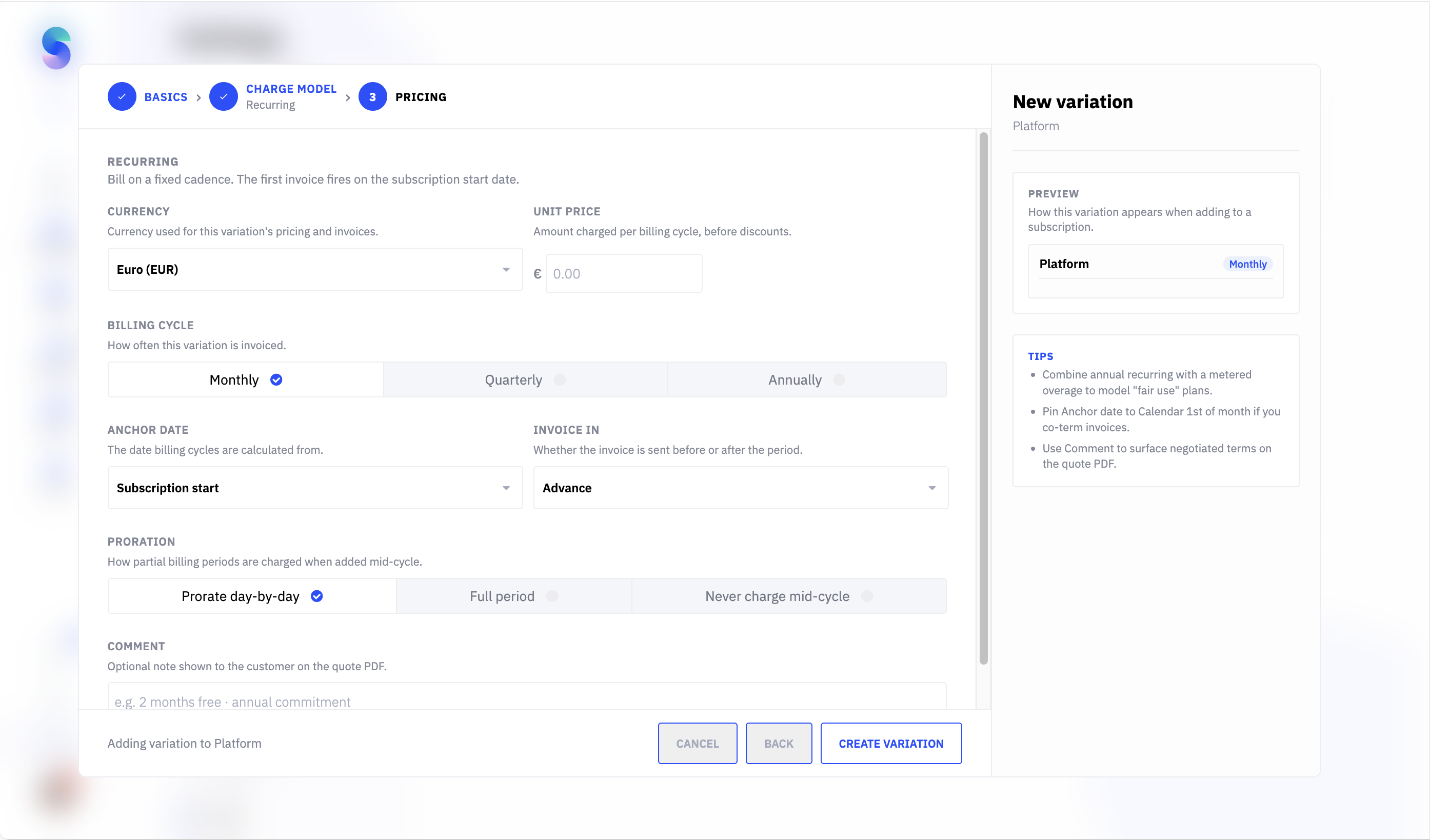
### 2. Charge model

<figure><img src="https://files.gitbook.com/v0/b/gitbook-x-prod.appspot.com/o/spaces%2Fttka6LKL3bc1LsaDzuI5%2Fuploads%2FrXFqXztEDPvOXw6RjokE%2FSka%CC%88rmavbild%202026-10-12%20kl.%2011.51.53.png?alt=media&#x26;token=35b44f83-87b9-46e6-89bb-4fb705287591" alt="The Charge model step of the Add variation window"><figcaption><p>Step 2 of the Add variation window: Charge model.</p></figcaption></figure>

* **One-time** – billed once. Good for setup, hardware and services.
* **Recurring** – charged on a fixed cadence: monthly, quarterly or annually.

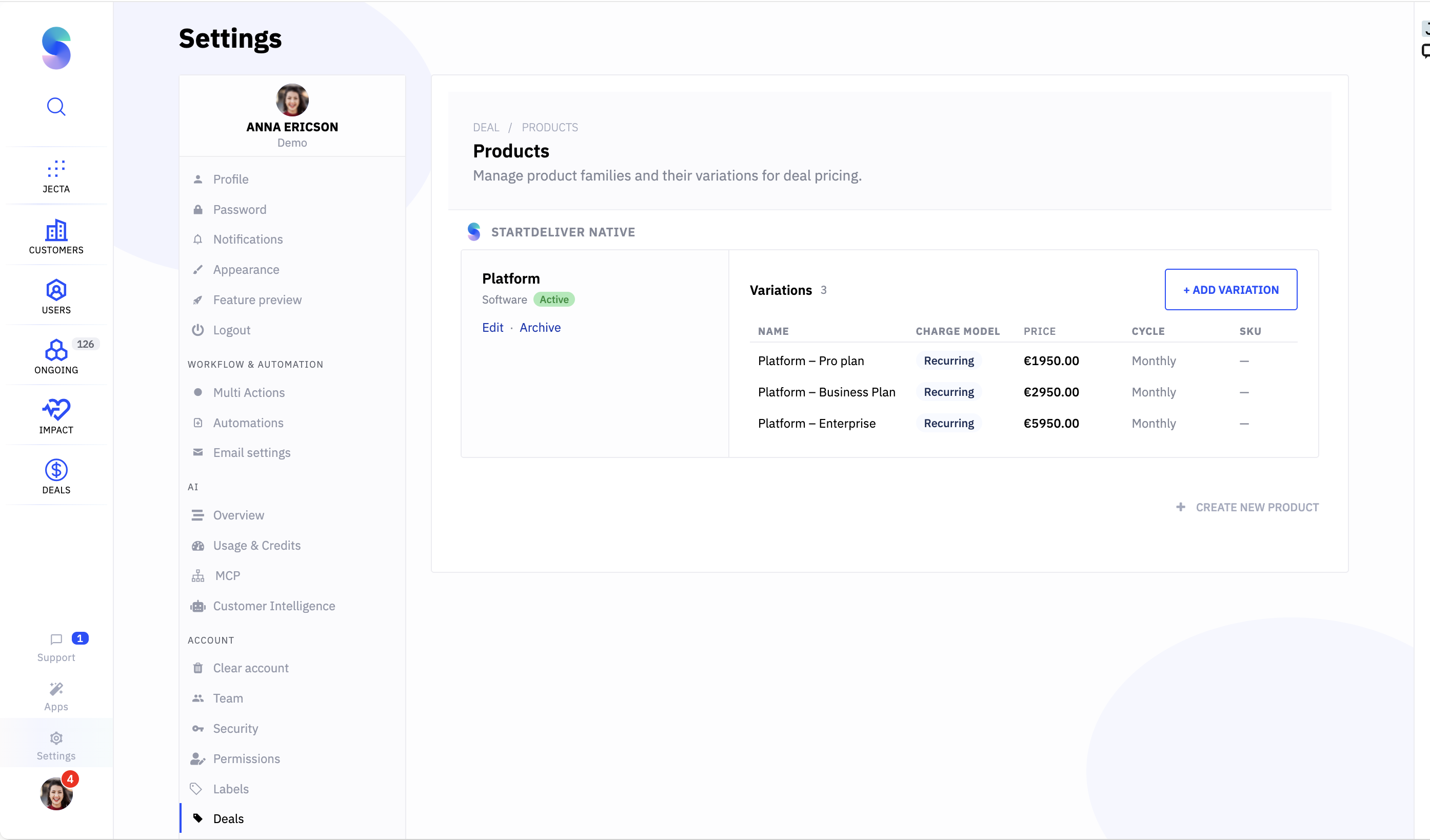
### 3. Pricing

For a recurring variation you set:

<figure><img src="https://files.gitbook.com/v0/b/gitbook-x-prod.appspot.com/o/spaces%2Fttka6LKL3bc1LsaDzuI5%2Fuploads%2FK5ZUjeivOPilH4D4qMzt%2FSka%CC%88rmavbild%202026-10-12%20kl.%2011.52.04.png?alt=media&#x26;token=c726cde0-982f-46dd-8118-ac9a7b37e934" alt="The Pricing step of the Add variation window"><figcaption><p>Step 3 of the Add variation window: Pricing.</p></figcaption></figure>

| Setting       | Description                                                                                                                       |
| ------------- | --------------------------------------------------------------------------------------------------------------------------------- |
| Currency      | The currency used for the price.                                                                                                  |
| Unit price    | The amount charged per billing cycle, before discounts.                                                                           |
| Billing cycle | Monthly, Quarterly or Annually.                                                                                                   |
| Anchor date   | The date billing cycles are calculated from: Subscription start or Calendar 1st of month.                                         |
| Invoice in    | Whether the invoice is sent before (Advance) or after the period.                                                                 |
| Proration     | How partial periods are charged when the variation is added mid-cycle: Prorate day-by-day, Full period or Never charge mid-cycle. |
| Comment       | Optional note shown to the customer on the quote PDF.                                                                             |

Click **Create variation** to save.

***

## Deal apps

**Settings → Deals → Apps** shows where your deals are managed. **Startdeliver Native** means deals are created and managed directly in Startdeliver.

***

## Related pages

* [Deals](https://docs.startdeliver.io/managing-customers/deals/using-deals.md)